
Page Last Updated:
August 10, 2004
White Paper:
Controlling Desktop
Software Expenditures
|
 |
Free Evaluation |
Metering and Licensing News | Company Info
SofTrack includes two powerful methods to inventory Windows® and Macintosh® workstations throughout your enterprise:
 Applications Usage Summary Applications Usage Summary
Applications NOT USED Report
Workstation Usage Summary
Benefits of SofTrack's Smart Inventory
SofTrack's Quick and Smart Inventory provide many benefits throughout your enterprise:
Overview:
Quick Inventory & Change Tracking
SofTrack's Quick Inventory Agent accurately determines in less than 20 seconds per workstation (less than 45 seconds for Macintosh computers) which applications are installed on all your Windows®-based and Macintosh® workstations. Quick Inventory also provides several hardware details of each Windows®-based and Macintosh® workstations throughout your enterprise.
SofTrack's Quick Inventory can also be used to collect software and hardware inventory data for remote/disconnected workstations such as laptops that are not directly connected to your enterprise network.
SofTrack's Quick Inventory data gathering modules can be configured to run from a logon script or other startup method. The modules can also be configured to be run automatically by the SofTrack Local Workstation Agent. SofTrack's patent-pending inventory agent collects all inventory data in less than 20 seconds per workstation.
NEW! SofTrack's Quick Inventory reports now include change tracking which can be used to discover:
Applications being installed including serial number
(Serial numbers only for Windows Applications)
Applications that have been added and/or removed
Windows Hotfixes and service packs installed
Windows Hotfixes and service packs removed
Internet Explorer updates
TCP/IP address changes per workstation
Machine BIOS revision changes
Physical RAM modifications
CPU changes
User Accounts Added/Removed (Macintosh only)
and more!
Click on the screen shots below (or right-click to open in a new window) to view examples of the reports SofTrack's Quick Inventory will provide for you:
Quick Inventory: Change Tracking Details
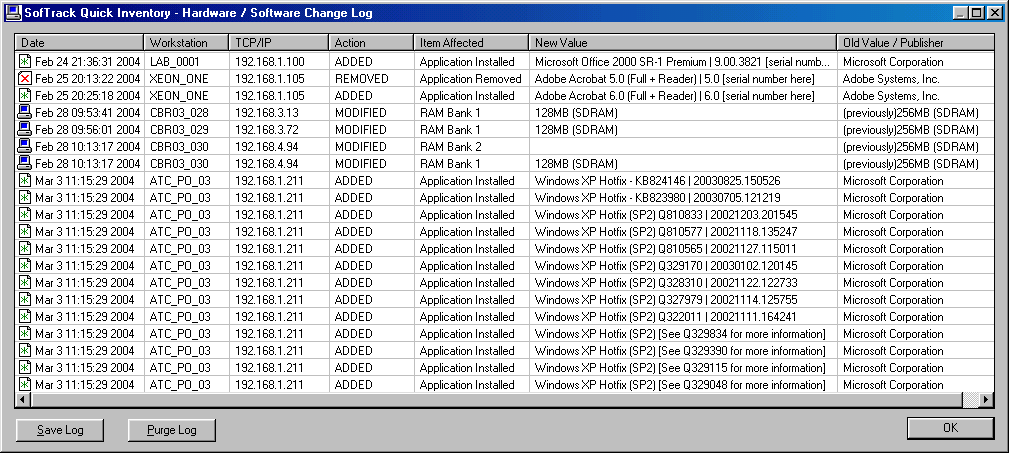

Report includes:
- Workstation Name
- Workstation's TCP/IP address at time change discovered
- Item Added, Modified or Removed
- Previous value
Quick Inventory: TCP/IP Address Changes

Report includes:
- Workstation Name
- Workstation's TCP/IP address at time change discovered
- New TCP/IP Address
- Previous TCP/IP Address
Quick Inventory: Applications Installed Summary
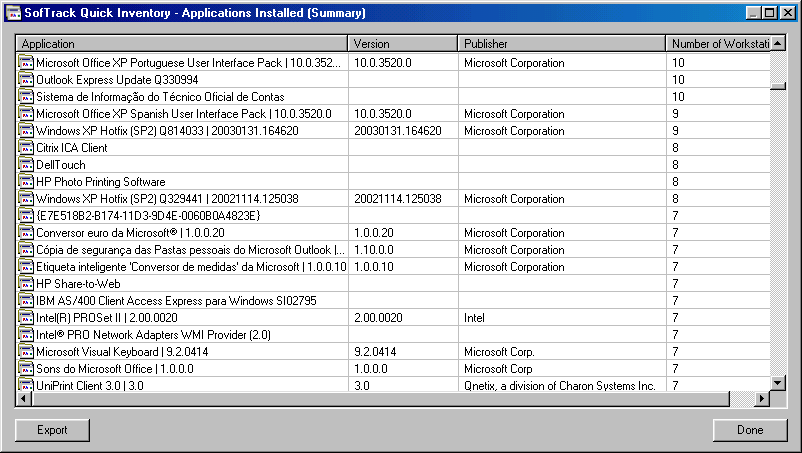
Report includes:
- Application Name
- Application Version
- Application Publisher
- Number of Installed Workstations Found
Quick Inventory: Workstation Details

Report includes:
- Workstation Name
- Workstation TCP/IP Address
- Windows®/Macintosh® O/S Version
- Windows Service Pack
- Size of Drive C:
- Free Space on Drive C:
- Amount of RAM installed
- Type of RAM installed in each Bank
- ROM BIOS Date and Revision
- Workstation Manufacturer
- Workstation Model
- Workstation Serial Number
- Internet Explorer version
- CPU Vendor
- CPU Type
- CPU Speed in MHz
- Same information is repeated if a second CPU is installed
- Network Adapters installed + Physical Address
Quick Inventory: Applications - List Workstations
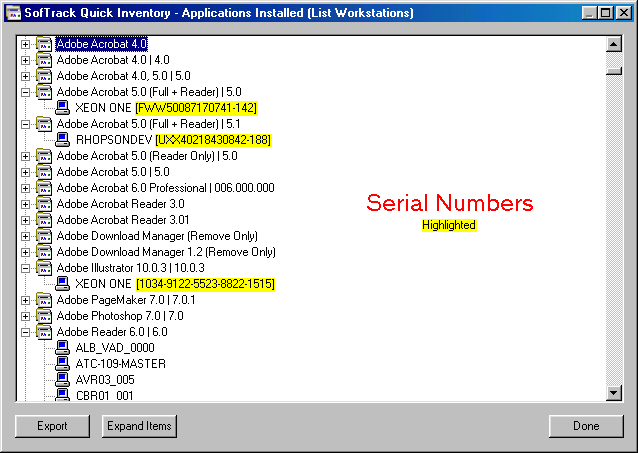
Report includes:
- List of Applications found
- Workstations found with Application installed
- NEW! Application Serial Number (Windows only)
Quick Inventory: Workstations - List Applications
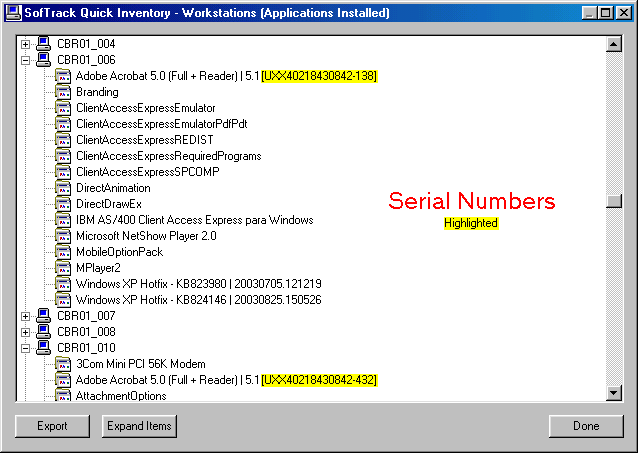
Report includes:
- List of Workstations
- Applications installed on each Workstation
- NEW! Application Serial Number (Windows only)
Quick Inventory: Applications - Serial Numbers

This Windows-only Report includes:
- Application Name
- Serial Number (Windows only)
- Application Version
- Publisher
- Workstation where installed
- Installation Date (if provided)
Quick Inventory: Workstations - Network Adapters
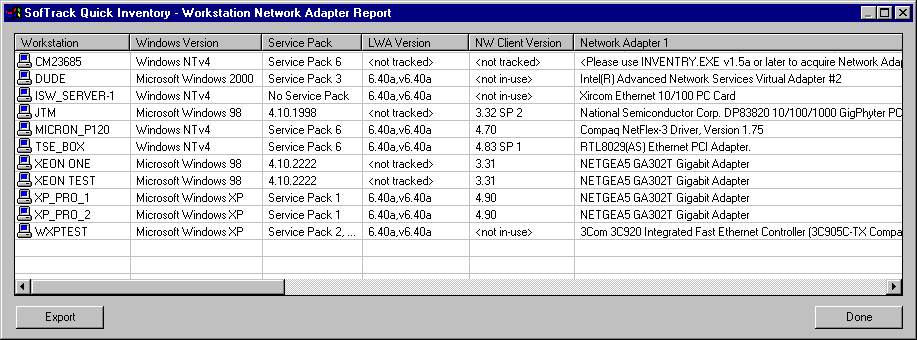
Report includes:
- Workstation
- Windows Version
- SofTrack Local Agent (LWA) Version
- NetWare Client Version (if installed)
- Network Adapters Installed
- TCP/IP Address
- AirPort Installed (Macintosh only)
- Modems Installed (Macintosh only)
Top of Page
Overview:
Smart Inventory
SofTrack's Smart Inventory builds upon the Quick Inventory gathered for each workstation in your enterprise. Quick Inventory determines where applications are installed per workstation and, via our patent-pending technology resolves the filenames that specify each application.
Smart Inventory, via the
SofTrack Local Workstation Agent, audits all application access and intelligently determines which applications are in use at each workstation.
This means, without having to know what applications are installed, SofTrack's Smart Inventory can tell you what applications are installed at each workstation and how those applications are being used!
You can use SofTrack's Smart Inventory to discover how many software licenses you actually need based upon how the software is used! SofTrack is the world's only product to give you our patent-pending Smart Inventory.
Now you will know if each installation of your applications are actually used or not. If applications are installed but are never used you can safely remove them.
Smart Inventory shows you which workstations are not using installed applications, thus saving money on your next upgrade or maintenance contract for each application removed!
Click on the screen shots below (or right-click to open in a new window) to view examples of the reports SofTrack's Smart Inventory will provide for you:
Smart Inventory: Applications Usage Summary
Number of workstations where installed and whether or not used

Report includes:
- Application Name
- Application Version
- Application Publisher
- Number of Workstations where the application is installed
- Number of Workstations where the application has been used
Smart Inventory: Applications NOT USED Report
Workstations where Applications are installed but not used
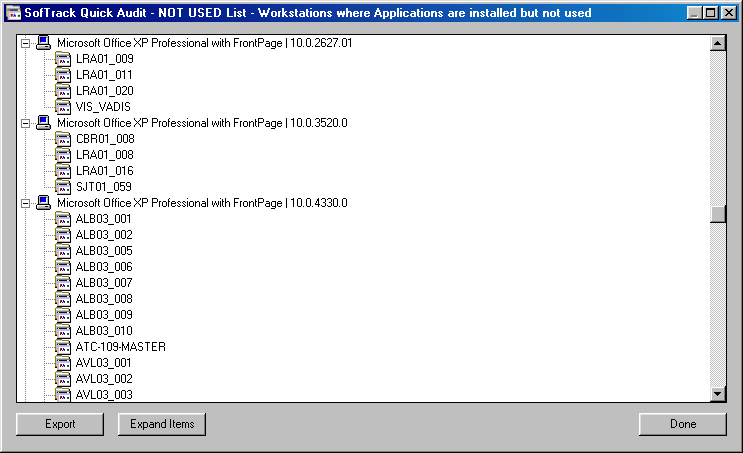
Report includes:
- Application Name
- Application Version
- Application Publisher
- Number of Workstations where the application is installed
- Number of Workstations where the application has been used
Smart Inventory: Workstation Usage Summary
Applications installed, how many times used and most recent use
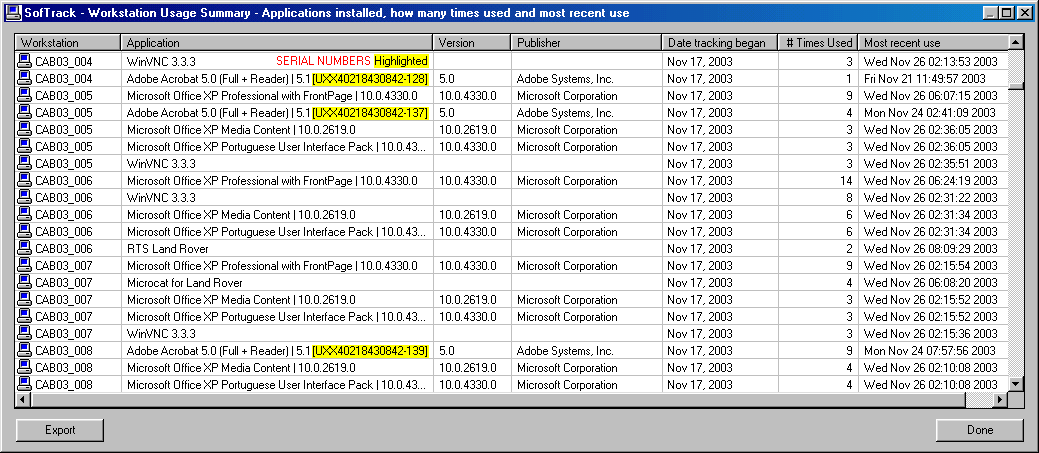
Report includes:
- Workstation Name
- Application Name
- NEW! Application Serial Number (Windows only)
- Application Version
- Application Publisher
- Date Tracking began
- Number of times used
- Date of most recent use
Top of Page
Benefits:
SofTrack Quick & Smart Inventory with Change Tracking
You can reduce the manpower required and increase the security of your workstations by implementing SofTrack's Quick Inventory and Change Tracking. Click here to view Smart Inventory's Benefits.
Quick Inventory and Change Tracking Benefits:
- Daily reports of workstation software changes:
Know what software is being installed including:
1) Windows Hotfixes + Service Packs
2) Unapproved internet software downloads
3) Unlicensed commercial software - use of unlicensed commercial software can result fines in excess of $100,000,
click here to learn more
- Daily reports of workstation hardware changes:
1) Changes in RAM configurations (is someone stealing workstation memory?)
2) TCP/IP addresses used by each workstation - know where malicious network activity is originating
3) Changes in Windows Operating System version and service pack revision (are your workstations being updated without your authorization or approval?)
- Summary reports of workstation configurations:
Now you will have insight to answer the following workstation configuration questions:
1) How many have less than 512MB of memory?
2) How many are using Windows® 2000 with service pack 1? These will need to be upgraded to service pack 3
3) How many are using BIOS Revision A02? These need to be upgraded to the latest to address security concerns
4) How many are running low on disk space on C: drive? Low disk space can affect performance of the system's local virtual memory cache.
5) How many have multiple CPUs? Perhaps these workstations need to be reassigned?
- Applications installation report:
1) Where applications are installed. Are there any workstations harboring out of date software or unlicensed software?
2) How many copies of each application is installed. Have you purchased licenses for each?
3) Is the same application + serial number (serial number reported for Windows applications only) installed on more than one workstation? Over installation of otherwise licensed software can be a serious copyright infringement.
SofTrack's Quick Inventory can answer these and many more workstation configuration questions.
Top of Page
SofTrack's Smart Inventory does not require any prior knowledge of what applications are installed at each of your workstations. Smart Inventory will reveal which applications are in-use at each workstation.
Smart Inventory Benefits:
- Quickly discover where applications are installed but are NEVER used. Unused applications represent an opportunity to save money$.
Save money by removing unused application installations. When unused applications are removed you can eliminate spending associated with the maintenance and upkeep of those unused licenses.
OR
Instead of purchasing additional licenses of applications you already own, simply move those installations by removing them where unused to where they are needed. You save money by simply reorganizing your existing installations!
- Know where applications are installed and where they are in-use.
Applications that are unused can be removed and/or uninstalled. When you remove unused applications, you can reduce the fees paid for upgrade charges and annual maintenance associated with the uninstalled licenses.
SofTrack's Smart Inventory gives you the power to save money by removing unused applications from workstations where they are never used!
- Know where applications are installed and how often they are used.
Follow up questions might include:
(a) Are the applications installed being underutilized?
(b) Do your users require further training in order to use the applications more efficiently or at all?
(c) Perhaps underutilization is due to users relying upon older, unapproved software?
- Drill down to the workstation level and discover what applications are being used at each workstation. Additionally discover how often the applications are being utilized.
Top of Page
|
|


